Residential

OverviewRooftop PV at volumeRoof & dronePlanes measured on the roofAttic & structureRafters recordedElectricalPanel and interconnectionDesign & engineeringModel to stamped set

Commercial & Industrial

OverviewBig roofs, real structureOn-site surveyRoof, structure, switchgearDesign & engineeringPE stampedVisual inspectionModule resolutionThermal inspectionFaults as heatElectroluminescenceCell-level cracks

Utility-Scale

OverviewThousands of acresLiDAR topographyTerrain before earthworkLand surveyingBoundary and topographicConstruction monitoringProgress, measuredThermal & ELEvery string

Across every scale

Site surveysRoof and electrical, one visitPermitting & engineeringStamped plan setsInspectionAerial thermal and ELShading analysisSA, TOF and TSRFSurvey locationsState and metro guides

The platform

Platform overviewPortal, 3D models, live dataShading analysisMove the sun yourselfCost calculatorWhat bad field data costs you

Sign in

Vanguard AccessInvite only · survey data portalScheduling & DispatchCrewLink · all verticals

Field Notes · build vs. buy

What a survey really costsPart 01 · the full modelUtilization is the whole gamePart 02 · a real TuesdayThe break-even headcountWhen hiring pays offTwo technicians, two roofsVariance, measuredThe hybrid crewIn-house plus outsourced

Field Notes · reference

Site survey checklistBuilt backwards from reworkHow long a survey takesHour by hourDo panels need a permit?What goes in the packageStorage site surveysThe capture listCompare survey vendorsQuestions to ask any vendor

Company

All servicesAll Field NotesAboutBook a 15-min call

Home  /  Field Notes  /  Survey software checklist

Field Notes · All verticals

Solar site survey software: a buyer’s checklist

Every survey app demos well on a sunny ranch house. The seven tests below decide whether it still works in a dark attic with no signal, and whether your designer can build from what comes back.

Buyer’s guideAll verticals8 min read
Short answer

The best solar site survey app is the one whose output your designer can use without calling the field. Judge any solar site survey software on seven things: capture that works offline, required fields that block an incomplete submission, photo QA before the technician leaves, measurements that carry a tolerance, structured export into your design and permitting tools, a turnaround you can schedule around, and clear ownership of the data. Features that don’t move one of those seven are decoration.

Judge the output, not the app

Most buying processes for survey software start with the capture screen: how the forms look, how fast the camera opens, whether it does augmented reality. That is not where the money goes.

The money is downstream. A survey is read by a designer, a permit office, a utility and, on framed roofs, a structural engineer. Every field data collection gap turns into one of three expensive things: a call back to the technician, a second truck roll, or a design that changes after the customer has seen it. So the useful question is not “which app is nicest to use?” It is “which app makes an incomplete survey hard to submit, and a complete one easy to use?”

That framing works whether you are a residential installer running a few hundred jobs a month, a C&I team surveying warehouse roofs and switchgear, or an EPC collecting site data for a ground mount. The capture lists differ. The seven tests don’t.

Interactive

Score the app you’re evaluating

Answer each row for the product in front of you. “Partly” means it can do it, but only if someone configures it or remembers to. The weights are our judgment of what drives rework, not an industry standard, so treat the number as a conversation starter.

Gauge showing the app's score out of 100 0 100 0 SURVEY-READY SCORE

Answer the seven rows to score it

  1. Offline captureWeight 15 · attics and basements have no signal
  2. Required fields that block submissionWeight 15 · busbar, main breaker, framing
  3. Photo QA before the truck leavesWeight 15 · shot list, legibility, completeness
  4. Measurements with a toleranceWeight 15 · pitch, azimuth, area, edges
  5. Structured export to design toolsWeight 15 · data, not only a PDF
  6. Turnaround you can schedule onWeight 10 · a commitment, not an average
  7. You own and can export the dataWeight 15 · and nobody else sees it

The seven criteria, and how to test each one

A vendor will say yes to all seven on a call. The test in each section is what to actually do in the trial so the yes means something.

01Offline capture that never loses work

The places a survey most needs data are the places with the worst signal: the attic, a basement service entrance, a utility room behind two walls, a rural ground-mount site. A solar survey app that needs a connection to save a form, or that silently drops photos when the upload fails, will eventually cost you a return trip.

Test it: put a phone in airplane mode, complete a full survey including 100+ photos, force-close the app, reopen it, then reconnect. Everything should still be there and sync without a technician babysitting it.

02Required fields that block an incomplete submission

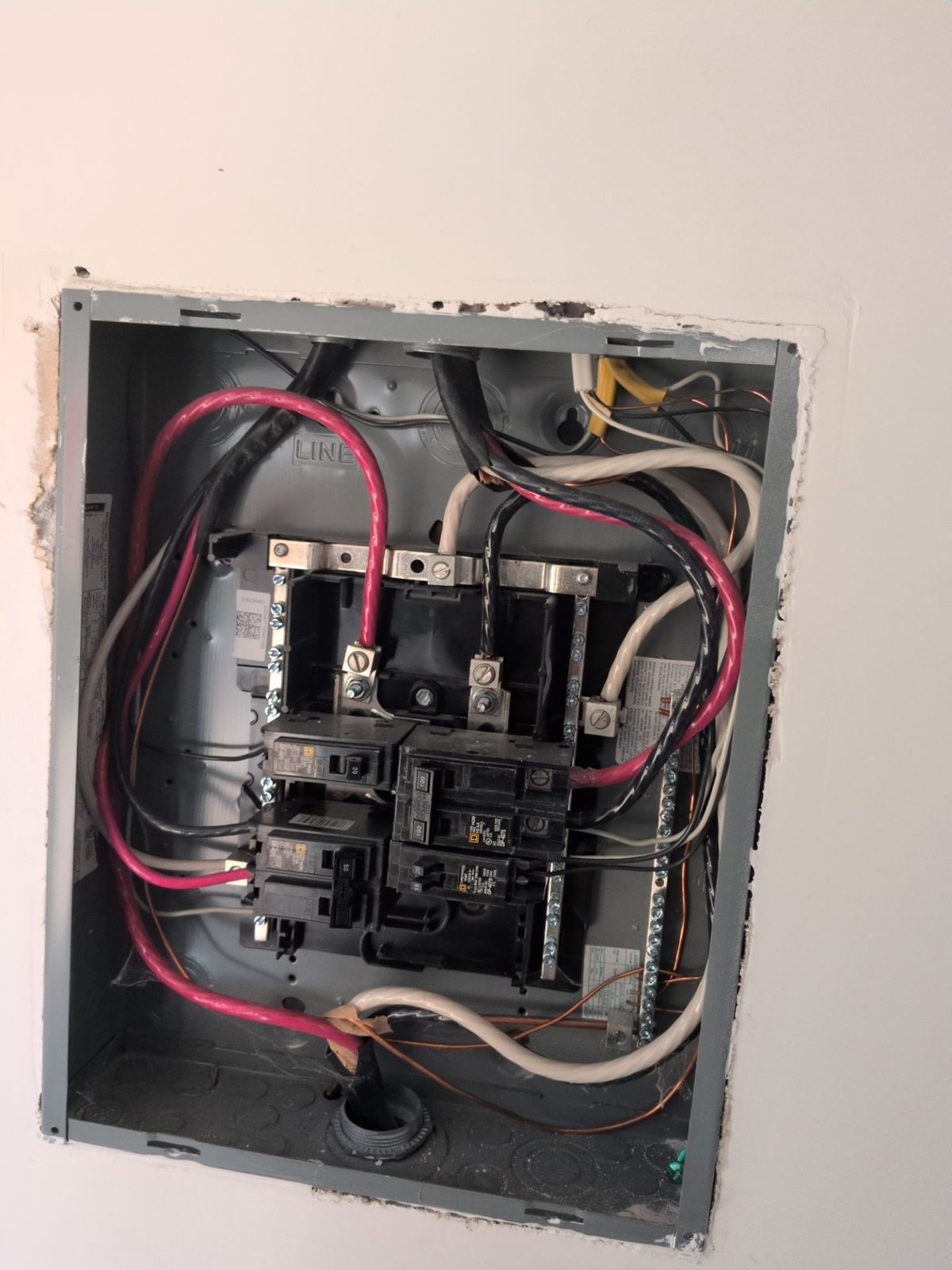
Optional fields are how surveys come back without the busbar rating. The fields that trigger redesigns should be impossible to skip: main breaker and busbar ratings, the panel interior photo, rafter or truss size, spacing and span, roofing type and layers, and the location of every obstruction on the array planes.

Just as important, “could not access” must be an explicit answer with a reason, not a blank. An engineer can work with “attic inaccessible, hatch sealed.” They cannot tell a skipped field from a forgotten one. Our residential survey requirements note lists what each downstream reader needs, if you want a starting set.

Test it: ask the vendor to show you the form builder, then try to submit a job with the panel section empty. If it goes through, so will your technicians’ incomplete jobs.

03Photo QA and completeness checks

Photos are the backup for every number on the survey, and they only work if they are the right photos. Good solar site survey software enforces a shot list per job type (the panel label, the meter, each roof plane, the attic framing with a tape in frame) and flags missing or unreadable ones, like a glare-washed panel label, before the technician drives away.

Then look at what happens after upload. Four hundred photos in one camera-roll folder is not a record; someone still has to find the main breaker. Photos should arrive sorted by what they show and tied to where they were taken.

Test it: run a survey and deliberately skip the meter photo and blur the panel label. See whether the app catches either one, and when.

04Measurements that carry a tolerance

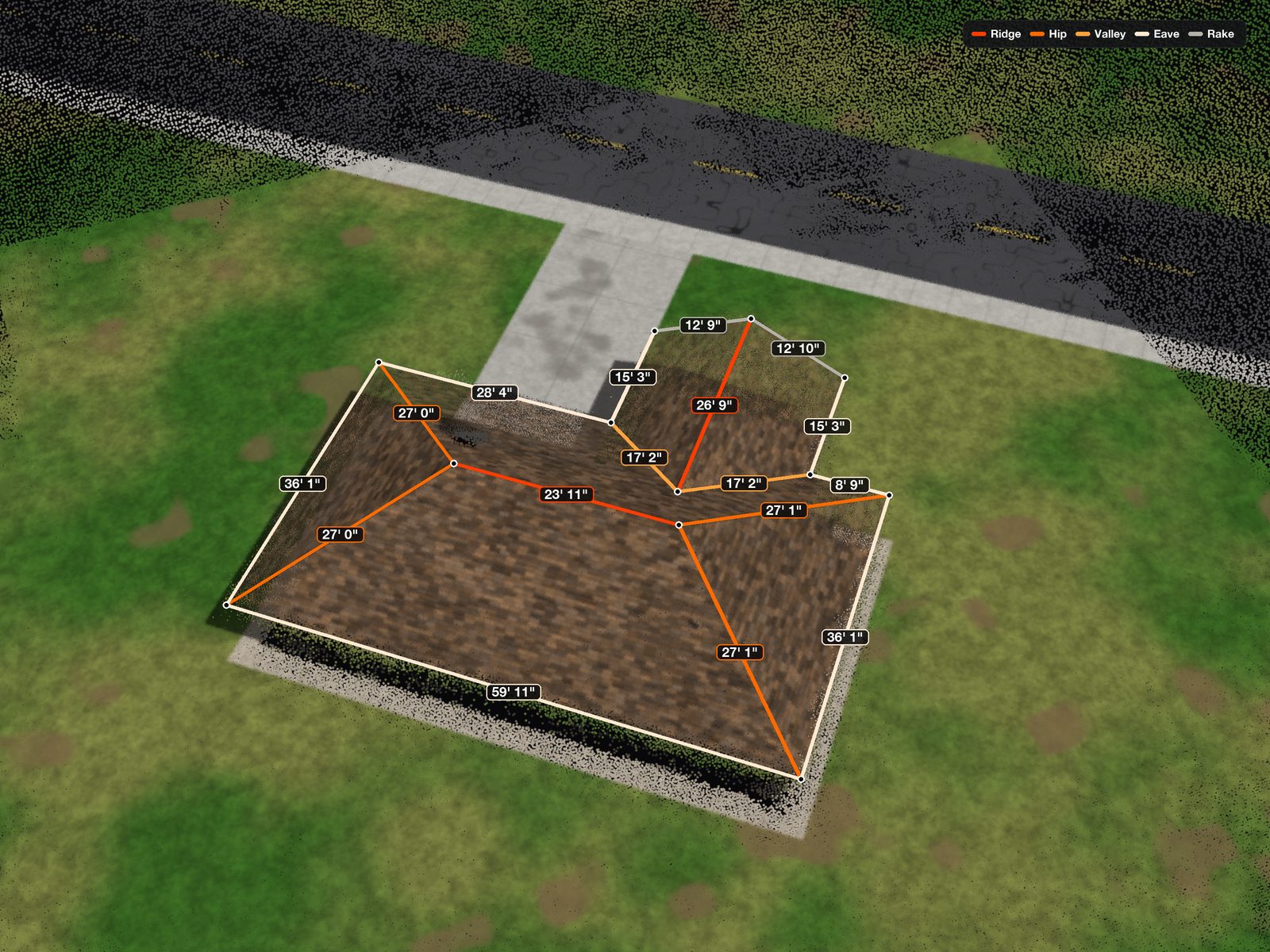
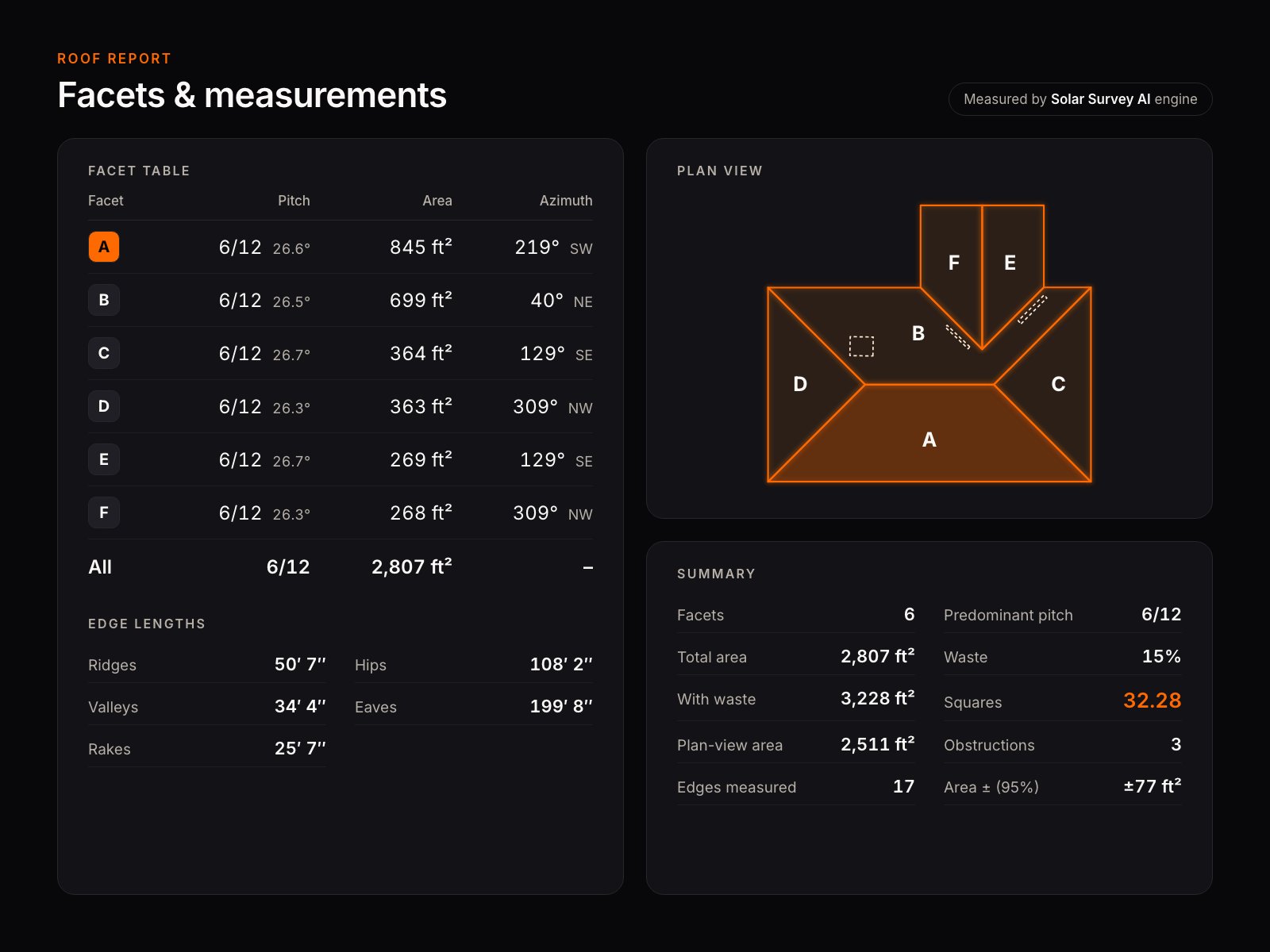
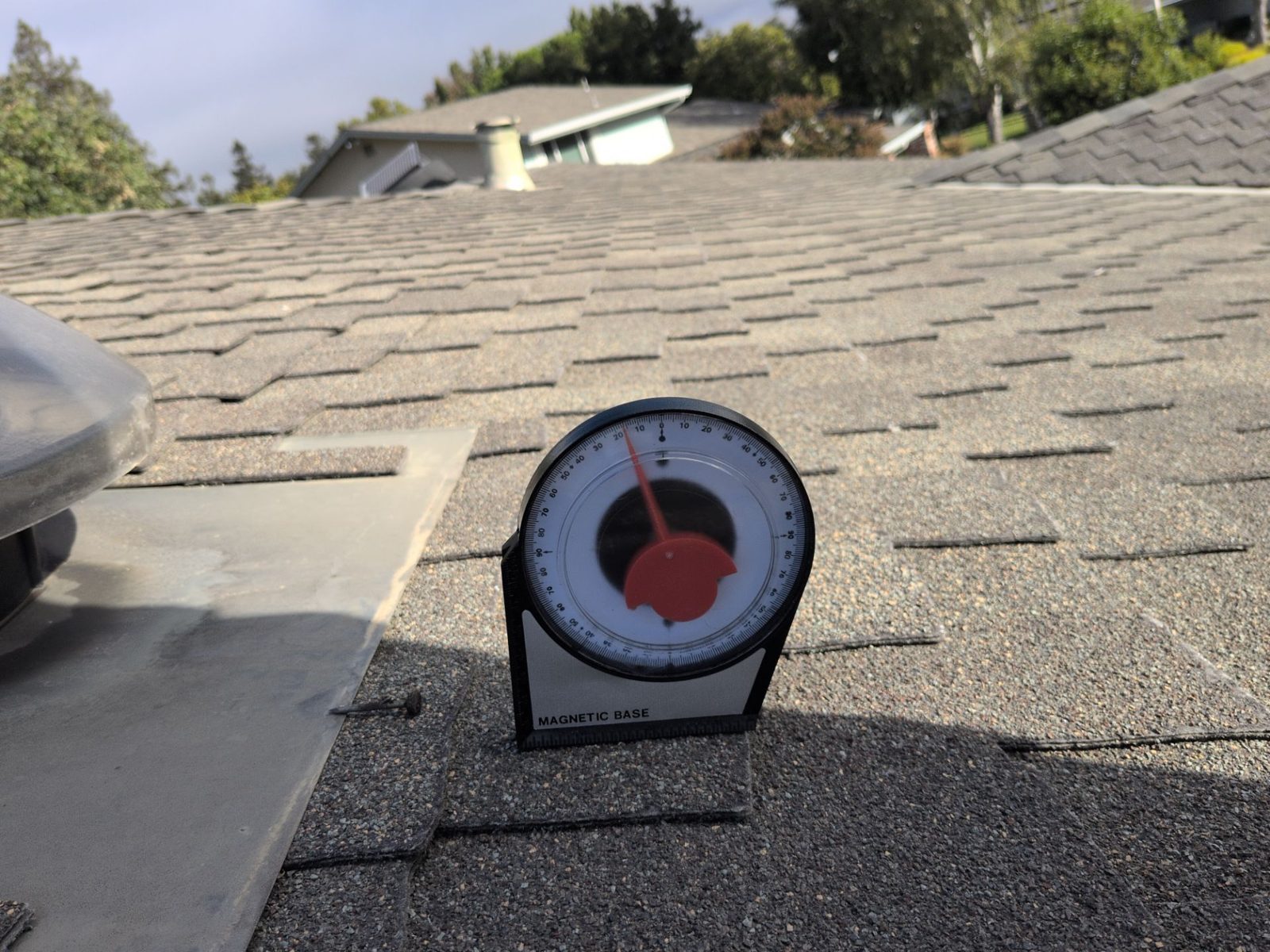
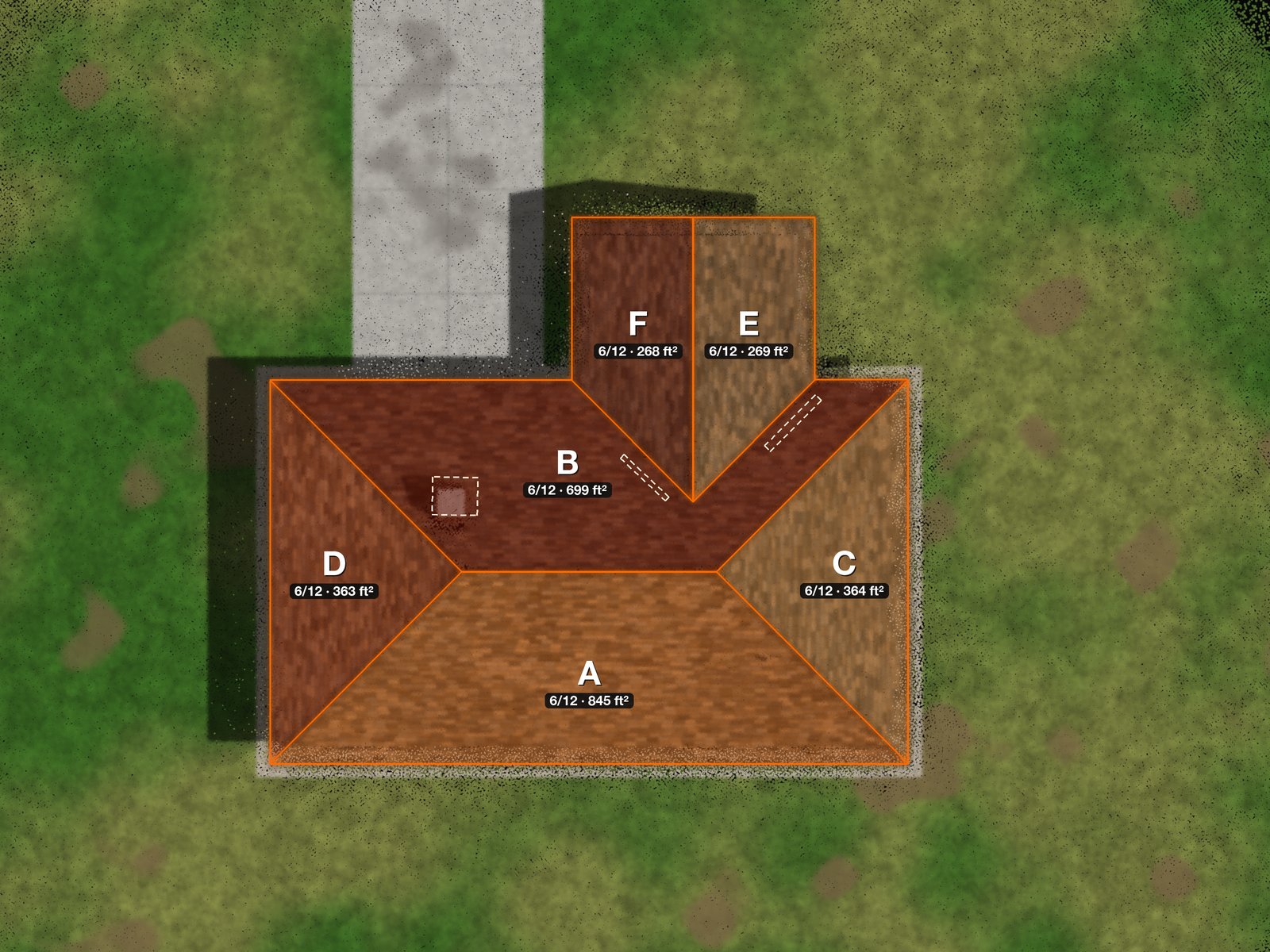
Roof pitch, azimuth, plane area and edge lengths drive the layout, the racking bill of materials and the setback geometry. Ask where each number comes from (tape and gauge on the roof, drone capture, aerial imagery or manual tracing) and how accurate it is. A figure with no stated uncertainty invites the designer to trust it exactly, which is how an array ends up six inches too close to a ridge.

Remote measurements are useful for qualifying a roof. They don’t see rafter spacing, a vent stack hidden by the tree canopy, or the bus rating inside the panel.

Test it: survey a roof you already have as-built numbers for and compare. Ask for the tolerance on area and pitch in writing.
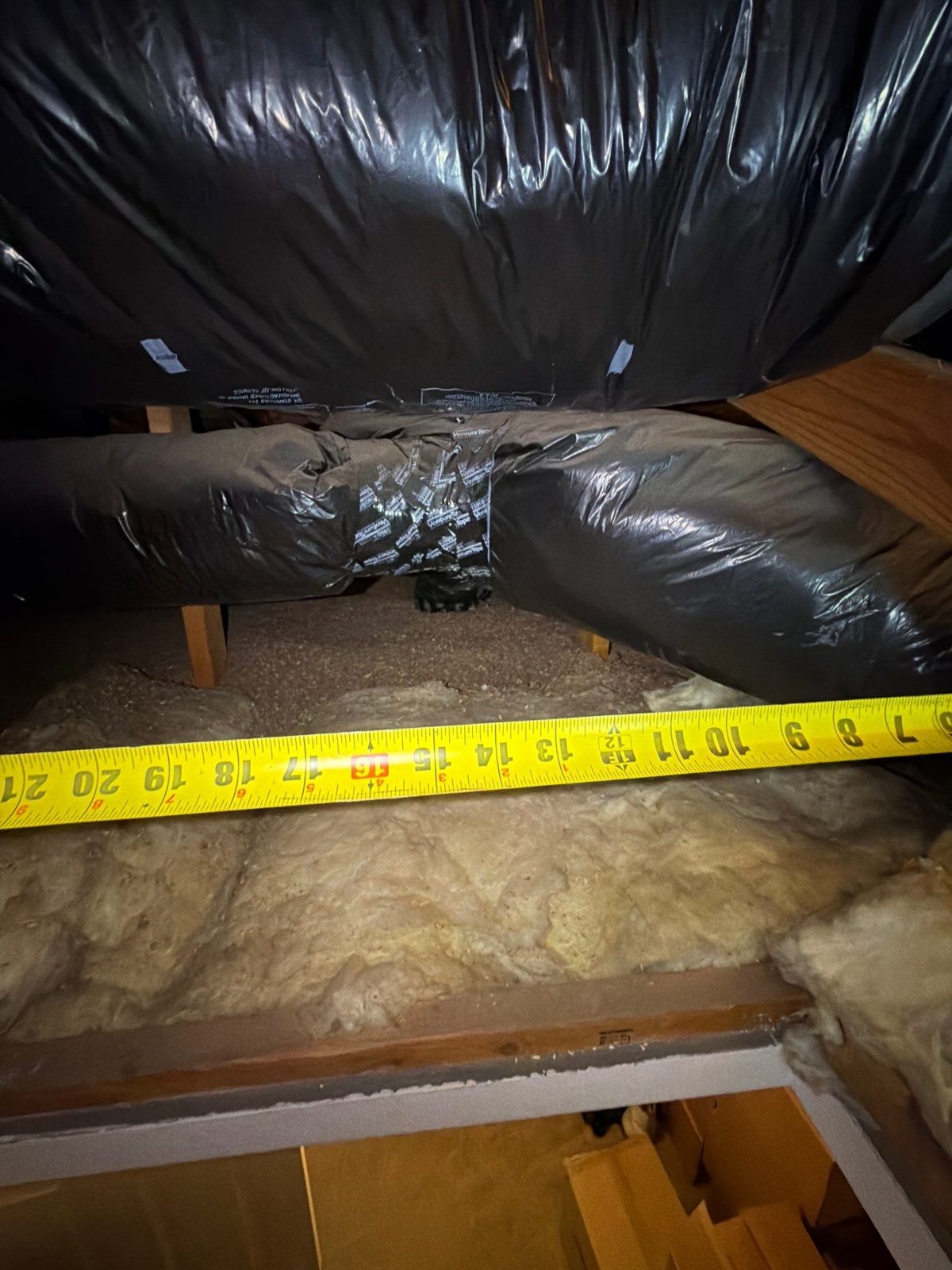
Tape measure stretched across attic framing beneath insulated ductwork, showing member spacing
Framing · measuredSpacing read off a tape in the attic, with the tape in the photo.
Residential load center with the dead front removed, showing breakers, bus and conductors
Service · requiredThe panel open, so ratings and spare spaces can be verified.
3D roof model over a point cloud with ridge, hip, valley, eave and rake lengths labelled
Geometry · modelledEvery edge classified and dimensioned on the 3D model.
Roof report with a facet table of pitch, area and azimuth, a plan view and an area tolerance at 95 percent
Deliverable · with toleranceFacet table, plan view and an area figure with its ± band.

05Integrations and export to design tools

A branded PDF is for the homeowner and the file. Your designer needs data: plane geometry, obstruction positions, panel ratings and shade values in a form they can load, not retype. Re-keying is where a 6/12 becomes a 12/6.

Ask what formats come out (CSV, JSON, an API, direct integrations with the design and CRM tools you already run) and whether the export includes the photos with their tags. If your jurisdictions use automated permitting such as NREL’s SolarAPP+, which checks a residential application for code compliance online, check that the survey captures the values that application asks for.

Test it: have your designer, not the vendor, take one exported survey into your design tool and time how long it takes to start a layout.

06Turnaround you can plan around

For an app your own team operates, turnaround is your team’s speed plus any processing step the software adds (a 3D model, a shade report, a desk review). For a survey service, it is the vendor’s commitment. Either way, ask for the number as a commitment with a consequence, not as a typical range. “Usually a few days” is an average with the bad weeks removed.

Batch intake matters here too. If you can’t send a week of addresses at once, someone on your team becomes the survey scheduler.

07Data ownership and client isolation

Survey records outlive the sale. They get pulled for permit corrections, warranty claims, roof leaks and resale. Get in writing that you own the photos and measurements, that you can bulk-export everything in usable formats if you leave, and how long records are retained.

If you use subcontracted crews or a survey partner, ask how the platform separates companies. Your homeowners, addresses and reports should be visible to your people and nobody else.
An app you operate, or a survey that arrives as data

Before comparing survey software for installers, decide which purchase you are making. An app is a tool your own technicians carry: you hire, train, schedule and equip the crew, and the software makes their capture more consistent. That is the right answer if you have the headcount and the volume to keep them busy. Our build vs. buy series works through that math.

The other option is a survey service, where someone else runs the crew and hands you the finished record. That is what we do. A Solar Survey AI technician covers the roof, the attic and the service panel in one visit, with a drone over the top. Nobody on your team learns a tool, flies anything or processes anything. Surveys are a flat $275 per site with a 48-hour turnaround from survey to deliverable, and we have delivered more than 50,000 of them. The details are on our site survey page.

What comes back is where the seven criteria above apply to us too. On our platform, photos are sorted automatically into structural, electrical and drone sets and pinned to where they were taken. Every roof section gets pitch, azimuth, area and edge lengths from a 3D model, with each measurement’s tolerance shown next to it. Shade is calculated for all 8,760 hours of a typical year on NREL typical-year weather data, giving solar access, TOF and TSRF per roof section. When QA signs off, the site lands in your portal and you can share it with your designer in one link. Each client sees only its own sites. The portal is in beta access for select clients.

We don’t publish a feature grid against other vendors. Our vendor comparison page has the seven questions we think you should ask anyone, us included.

Five things to bring to the demo

  • Your worst roof. A cut-up hip roof with dormers, not the vendor’s sample job.
  • Your current survey form. Map every field you require to where it lives in their product.
  • Your designer. They are the customer of the output. Let them ask about export.
  • A phone in airplane mode. Run the offline test live, on the call.
  • Your last three redesigns. Ask which field or check would have caught each one.

If you want the full field capture list to test against, the site survey checklist is built backwards from the rework each item prevents.

Questions installers ask

What is the best solar site survey app?

The one whose output your designer can use without calling the field. Test any candidate on offline capture, required fields that block incomplete submissions, photo QA, measurements with a stated tolerance, structured export to your design tools, a committed turnaround and clear data ownership. The best fit depends on whether you run your own survey crew or buy surveys as a service.

What should solar site survey software capture?

At minimum: roof plane pitch, azimuth, dimensions and obstructions; roofing type and condition; rafter or truss size, spacing and span; main breaker and busbar ratings with the panel open; meter and interconnection details; shading from each array area; and equipment locations and access notes, each backed by photos.

Does a solar survey app need to work offline?

Yes. Attics, basements and rural sites often have no signal. The app should save every field and photo locally, survive being closed, and sync on its own when the connection returns.

Is a PDF report enough to hand to a designer?

It is enough for the file, not for design. Designers need structured data they can load into their tools, such as plane geometry, obstruction positions and electrical ratings, so nothing is re-keyed by hand.

Should we buy survey software or outsource surveys?

Software makes sense when you have enough steady volume to keep your own trained technicians busy. Outsourcing makes sense when volume is uneven or spread out geographically. Our build vs. buy field notes walk through the math.

Keep reading

See what lands in your portal

Bring one project and your monthly volume. We’ll tell you straight whether we fit.

Book a 15-min call
Book a 15-min call